Jekyll Press
The Problem
GitHub Pages is arguably the best place to host a developer blog:
- It’s Free: No hosting costs.
- It’s Fast: Static site generation via Jekyll.
- It’s Version Controlled: You own your data forever.
But the writing experience is terrible, especially on mobile.
To publish a simple post, you usually have to:
- Open a desktop IDE (VS Code / Cursor).
- Manually create a file with a specific date format:
2026-01-11-my-post.md. - Manually type out YAML Frontmatter.
- Images are a nightmare: You have to put the image in an assets folder, rename it, compress it yourself, and then manually type the relative Markdown path.
- Commit, Push, Handle Merge Conflicts.
On mobile, it’s even worse. The GitHub mobile app is designed for code review, not prose writing. You have to click through 10 layers of folders just to find _posts. Let alone pasting images or putting links in your posts.
The Solution
Jekyll Press is a Flutter-based Android app that treats your GitHub repository like a Headless CMS. It abstracts away the Git complexity and gives you a WordPress-like experience.
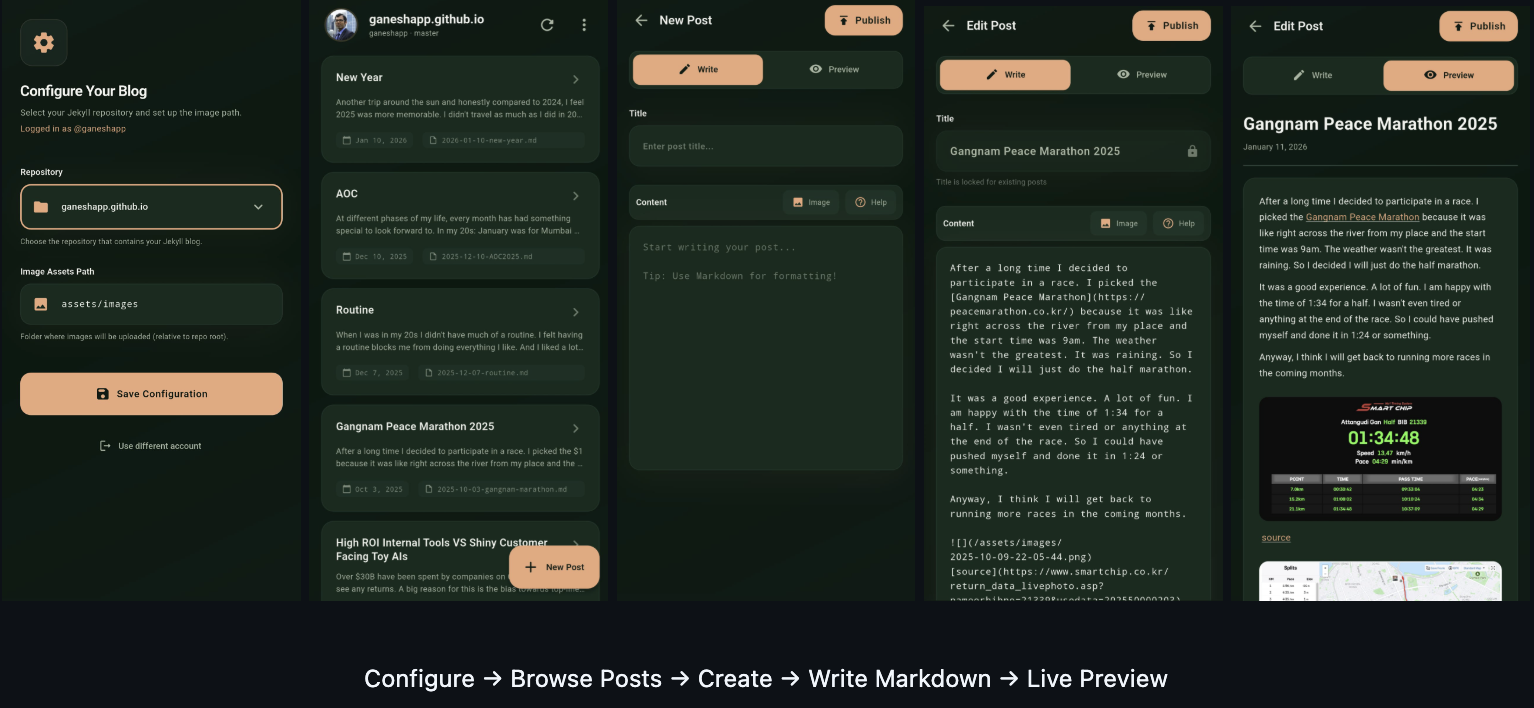
Key Features
- Zero Git Commands: No
git pullorgit push. The app uses the GitHub REST API directly. So there is no bloat and the app is fast and remains small. - Mobile-First Editor: Write in Markdown with a live preview toggle.
- Automated Frontmatter: The app handles the dates, titles, and file naming conventions for you.
- Smart Image Handling: Pick an image from your gallery.
- Auto-Compression: Resizes to max 1080p and compresses (JPEG 85%) to save bandwidth.
- Privacy: Strips EXIF metadata (GPS location) before upload.
- Auto-Upload: Uploads to your configured assets folder and inserts the correct Markdown link automatically.
- Offline Support: Write drafts on the plane; sync when you land.
Technical Architecture & Design Choices
I made specific technical trade-offs to keep the app lightweight and fast.
1. REST API vs. Git Protocol
- Decision: We use the GitHub REST API exclusively. We do not clone the repository.
- Why: A standard
git clonedownloads the entire history of the repository. On a mobile device, this bloats storage and eats data. - Trade-off: We lose the ability to do complex merges.
- Mitigation: The app is designed for content appending. It assumes you are the primary writer. If a file conflict occurs (rare), the API rejects the update, protecting your data.
2. The “Local-First” Image Resolver
- Problem: When you add an image in the editor, it takes time to upload. If you are offline, you can’t upload it. How do you preview it?
- Solution: 1. The app saves a local copy of the compressed image in the app’s internal storage.
- It maps the filename (e.g.,
img_123.jpg) to the local path in a local database (Hive). - The Markdown Previewer intercepts image requests. It checks: “Do I have this image locally?”
- Yes: Load from disk (Instant, works offline).
- No: Load from GitHub Raw URL.
- It maps the filename (e.g.,
3. Read-Only Titles for Existing Posts
- Decision: You cannot edit the Title or Date of an existing published post.
- Why: In Jekyll, the filename (derived from date+title) dictates the permalink URL. Changing the title would rename the file, breaking all existing links to that post on the internet (SEO disaster).
- Trade-off: Slightly less flexibility for the user.
- Benefit: Prevents accidental broken links.
Tech Stack
- Framework: Flutter (Android target)
- State Management: Riverpod
- Networking: Dio (HTTP client)
- Local DB: Hive (NoSQL for drafts & config)
- Secure Storage: flutter_secure_storage (For storing GitHub Tokens)
Download and Repository
APK Download: Jekyll Press APK
Github Repo: Jekyll Press